Rofi Script to Dynamically Rename Current Niri Workspace (yes, I switched to Niri)
I switched to Niri
And I have been very happy with it!
Niri is a “scrollable-tiling” window manager Wayland compositor.
It is difficult to explain exactly how it works without a visual demonstration, but i like to think of it as having infinite horizontal space (the “scrolling” part) as well as infinite vertical space (workspaces).
Beyond the scrolling model, Niri is a well-designed compositors with features like:
- an overview mode, hotkey hints, and other quality-of-life features.
- excellent documentation, automatic config reloading, and helpful error messages.
- modular design (including Gnome toolkit integration and
xwayland-satellitefor XWayland support).
However, you would be mistaken to try to force your old i3 or other tiling WM workflow onto it. For instance, by default, Niri automatically deletes empty workspaces. While you can use static “named” workspaces, Niri actively discourages defining 10 static workspaces as you might in other tiling WM.
The intended workflow is to utilize a new workspace for each new “project,” utilizing the scrolling model to manage multiple windows within a single workspace. If that sounds confusing, I highly recommend trying it out yourself. Niri is friendly to configured, and you won’t regret it.
Dynamic Workspace Renaming Script
Here is the core of my workflow.
When you are dynamically creating and moving workspaces, naming them helps you keep all the “projects” organized. Niri provides two commands to mange workspace names:
1niri msg action set-workspace-name "my workspace"
2niri msg action unset-workspace-name
To maximize this dynamic workspace workflow, I wrote a Rofi script that prompts for a name and renames the current workspace (with an option to reset it once you have finished the project).

Here is the script.
1#!/usr/bin/env bash
2
3# Options
4rename=' rename'
5reset=' reset'
6cancel=' cancel'
7
8function run_rofi_selection() {
9 echo -e "$rename\n$reset\n$cancel" | rofi -dmenu -p ">" -mesg "Changing Current Workspace Name"
10}
11
12function get_name() {
13 echo "" | rofi -dmenu -p "Enter Workspace Name:" -l 0
14}
15
16function main() {
17 chosen="$(run_rofi_selection)"
18 case $chosen in
19 $rename)
20 niri msg action set-workspace-name $(get_name)
21 ;;
22 $reset)
23 niri msg action unset-workspace-name
24 ;;
25 esac
26}
27
28mainYou can bind this to a keymap or make a Waybar module like I did:
1 "custom/niri-workspace-rename": {
2 "format": " ",
3 "tooltip": true,
4 "tooltip-format": "Rename Current Workspace",
5 "on-click": "/path/to/rofi-niri-workspace-rename.sh",
6 },My Workflow
Putting it all together, here is a brief overview of how I use Niri:
When a new project comes up, say, I need to do a homework for CS381: Analysis of Algorithms.
- I open windows related to the assignment (new LibreWolf window, Zathura for the textbook, and Neovim for my LaTeX files, …).
- I move all the windows to the next available workspace; say, workspace 5.
- I rearrange windows so the most important windows, Neovim in this case, is in the center.
- I use the script to rename the workspace.
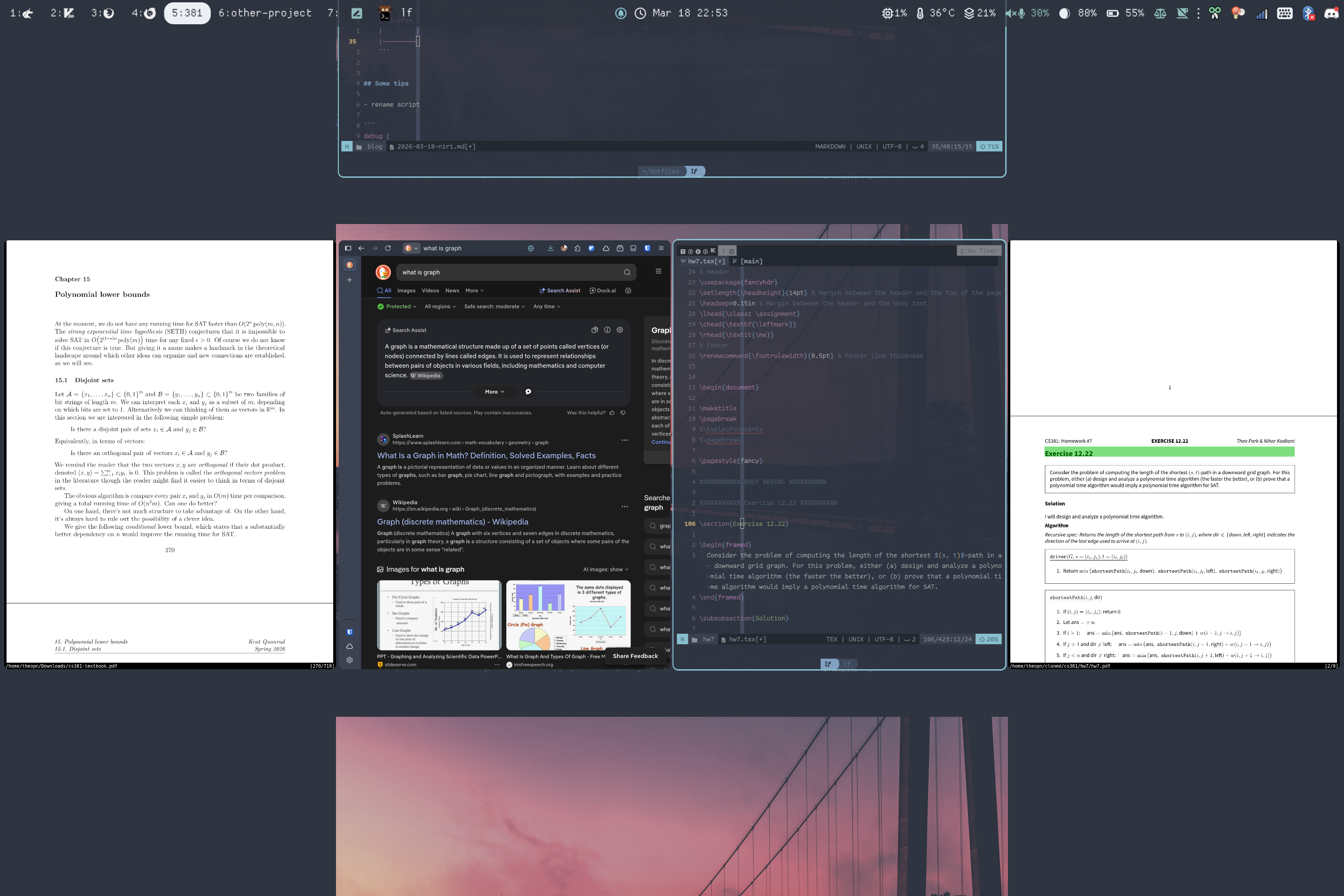
Now, when I am working, everything I need is just one or two Super+H/L away.
I can also dynamically resize windows to focus on the code without breaking the overall layout.
Note on my config:
- I have 4 named workspaces (1: Org-agenda and other productivity tools, 2: terminal window, 3: browser, 4: email and messaging apps).
- Consider them as “projects” that are always ongoing.
Conclusion
they see me scrollin'