A sane starting point for writing tab_bar.py for Kitty
Writing a custom Kitty tab bar can be tedious, as you have to understand how the default tab_bar.py works, as well as the surrounding modules like boss.py and tabs.py.
I have been experimenting with Kitty as a potential replacement for Wezterm, and I wanted the following items in the tab bar:
- Tab index
- Current tab layout
- Current working directory
- Current process
I did not get too far with kitty.conf, as listing all those items in tab_title_template rendered each tab too long; I needed to use Python.
But even though this discussion page exists, I still found writing the draw_tab function from scratch a little overwhelming, especially because I wanted things like mouse clicking to work as well.
After reading the discussion page and many dotfiles, I found a good starting point: modifying the draw_data and simply calling one of the built-in functions.
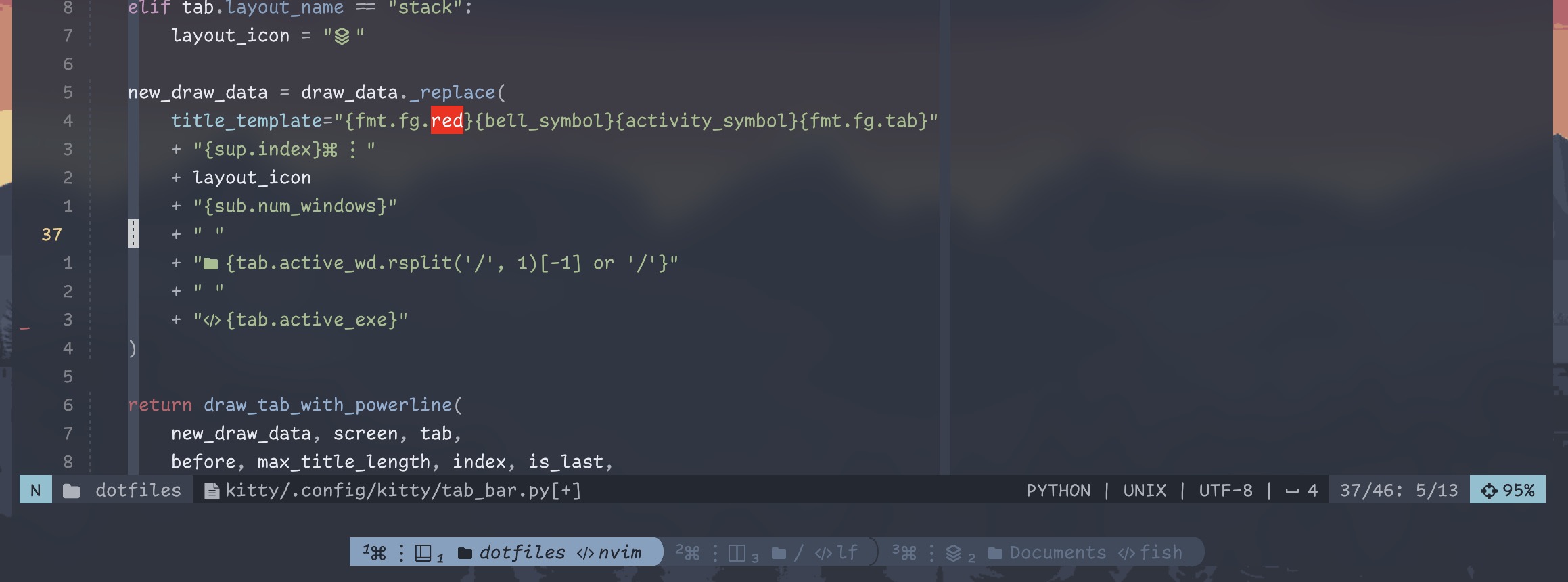
tab_bar.py
1from kitty.fast_data_types import Screen
2from kitty.tab_bar import (DrawData,
3 TabBarData,
4 ExtraData,
5 draw_tab_with_powerline,
6 )
7
8
9def draw_tab(
10 draw_data: DrawData, screen: Screen, tab: TabBarData,
11 before: int, max_title_length: int, index: int, is_last: bool,
12 extra_data: ExtraData,
13) -> int:
14 """
15 Kitty's DrawData is defined here:
16 https://github.com/kovidgoyal/kitty/blob/master/kitty/tab_bar.py#L58
17
18 Strat is to edit title_template and active_title_template
19 and call the original draw_tab_with_* function.
20 """
21
22 layout_icon = "?"
23 if tab.layout_name == "tall":
24 layout_icon = " "
25 elif tab.layout_name == "vertical":
26 layout_icon = " "
27 elif tab.layout_name == "horizontal":
28 layout_icon = " "
29 elif tab.layout_name == "stack":
30 layout_icon = " "
31
32 new_draw_data = draw_data._replace(
33 title_template="{fmt.fg.red}{bell_symbol}{activity_symbol}{fmt.fg.tab}"
34 + "{sup.index} "
35 + layout_icon
36 + "{sub.num_windows}"
37 + " "
38 + " {tab.active_wd.rsplit('/', 1)[-1] or '/'}"
39 + " "
40 + " {tab.active_exe}"
41 + " {title}"
42
43 # active_title_template inherits title_template if nil
44 )
45
46 return draw_tab_with_powerline(
47 new_draw_data, screen, tab,
48 before, max_title_length, index, is_last,
49 extra_data)kitty.conf:
# ...

tab_bar_style custom
# This is still used since i call `draw_tab_with_powerline` in tab_bar.py
tab_powerline_style round
tab_bar_align center
tab_bar_min_tabs 1
tab_title_max_length 0

# ...
A future optimization is to use tab.title instead of calling active_wd/active_exe, since apparently those calls are apparently expensive.
I have been studying TabAccessor and the tab title functions to find a way to (a) check if the tab name has been manually changed (b) parse current executable and CWD from the title instead of system calls.
So… yeah, I guess you do have to learn how Kitty works.